Canva KDP Sermon Notes Notebook: Your Complete Interior Template
You have a message to share, but the technical hurdles of publishing can feel overwhelming. The Canva KDP Sermon Notes Notebook is a practical solution designed to bridge that gap. It's not just a set of pages; it's a ready-to-publish interior system that combines professional structure with complete creative control. This template provides the foundational layout for a 100-page sermon journal, pre-formatted for Kindle Direct Publishing, while giving you the freedom to infuse your personal or brand style through Canva's free editor.
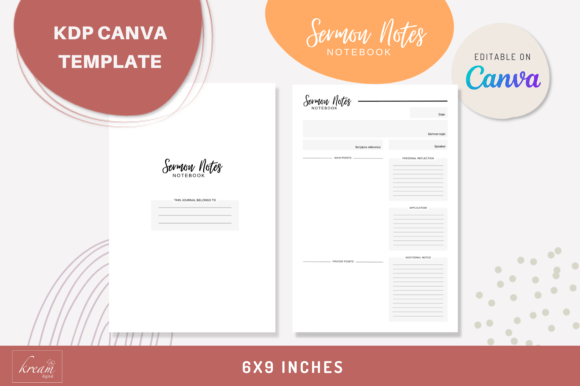
What you receive is a streamlined publishing kit. Inside the package, you'll find a clear PDF with instructions to access your editable Canva template, a separate PDF containing all 100 pages formatted and ready for immediate upload to KDP Amazon, and two PNG files for each template variation. The core of the product is the Canva project itself, which contains two distinct templates designed in the standard 6×9 inch trim size—the most popular dimension for journals and notebooks on Amazon.
Anatomy of a Thoughtful Interior
The first template is a simple, welcoming introduction page. This sets the tone for the entire book, offering a dedicated space for a title, a brief message, or a scripture that frames the purpose of the journal. It’s your first impression, designed to be clean and inviting.
The real workhorse is the second template: the Sermon Notes Page. This layout is meticulously structured to guide the user through capturing a sermon effectively. Each page includes dedicated fields for the essential elements of any sermon: the date, the sermon topic, the scripture reference, and the speaker. Below these, you’ll find ample space for the core content: main points, prayer points, and personal reflection. The design also incorporates sections for application—how to put the teaching into practice—and additional notes, ensuring no insight is lost. This structure isn't arbitrary; it’s a proven framework that helps listeners engage more deeply and retain more of what they hear.
Practical Applications Beyond the Pew
While the name suggests a specific use, the versatility of this Canva KDP Sermon Notes Notebook template is one of its strongest assets. For small business owners and entrepreneurs, it can be repurposed as a powerful meeting notes journal or a client consultation log. The fields for main points and application are perfect for capturing action items and follow-ups. Content creators and bloggers can adapt it into a content planning journal, where the "sermon topic" becomes a blog post title and the "main points" outline the article's structure.
The visual style of the templates is intentionally neutral and professional. It avoids overly ornate design assets that might clash with a user's added content. This makes it an excellent brand identity tool. A church ministry can add its logo and color scheme to the introduction page and headers, creating a cohesive, branded journal for its congregation. A graphic designer could use it as a starting point for a client project, customizing the typeface and layout in Canva to match a specific modern typography aesthetic. The ability to change text, colors, fonts, and layout style means the template is a flexible foundation, not a rigid cage.
Design, Readability, and the User Experience
A journal is only useful if it's comfortable to use. The layout of the Canva KDP Sermon Notes Notebook prioritizes readability and a clean visual hierarchy. The ample line spacing and clear section headers (like "Main Points" and "Prayer Points") guide the eye naturally. This thoughtful editorial design reduces cognitive load, allowing the user to focus on the content of the sermon rather than struggling with the format of the page.
When you customize the template in Canva, consider the principles of effective font pairing. If you change the main body font, pair a clean sans serif font for the headers with a highly legible serif or sans serif for the note-taking lines. Avoid overly decorative script fonts or handwritten fonts for the primary text fields, as these can hinder quick writing and later review. The goal is to create a harmonious balance between personality and practicality, ensuring the final product feels both special and supremely functional.
From Digital Edit to Physical Product
The path from customization to a published book is straightforward. Once you've edited the Canva template to your satisfaction, you can export the 100-page PDF provided. This file has been checked and formatted to meet KDP's specifications, including proper margins and bleed settings for the 6×9 inch trim size. This removes the most common technical barrier for first-time publishers.
The included PNG files offer additional flexibility. They can be used for creating promotional mockups of your notebook for social media graphics or your website. They serve as a visual reference and a marketing asset, helping you present your finished product professionally before it even goes live on Amazon.
Ultimately, this template is about empowerment. It provides a professional, tested structure so you can focus on what matters: adding your unique voice, message, and creative font choices to build a useful tool for your community or audience. Whether you're a pastor, a teacher, a small group leader, or a creative professional looking for a structured journal format, the Canva KDP Sermon Notes Notebook offers a practical, polished, and endlessly adaptable starting point. It’s a testament to how smart design assets can streamline the creative process, turning an idea into a tangible, useful product with remarkable efficiency.